

A QuickBooks cleanup means turning a file full of unreconciled, miscategorized or duplicated transactions into books you can file taxes from and make decisions with. The order matters more than the speed. Save a baseline first, lock the years already filed, then reconcile to your real bank statements from the oldest month forward. Fix categories, open invoices and bills, and payroll after that, and review the result before you trust it.
This guide walks through that order, shows what to do yourself, and says plainly when a CPA should take over.
TL;DR
- Before you change anything, export a baseline of your reports and lock every period that has already been filed with a tax return.
- Reconcile to the actual bank and credit card statements, oldest month first, not to the bank feed.
- Clean up in this order: cash accounts, uncategorized transactions, receivables and payables, payroll liabilities, then fixed assets and equity.
- Cleanup cost depends on how many months are off, how many accounts you have, and whether payroll or multiple entities are involved, so get a written scope before work starts.
- Once the books are clean, a monthly reconciliation habit keeps them that way.
Table of Contents
- Signs your QuickBooks file needs a cleanup
- Before you touch anything: four safeguards
- The QuickBooks cleanup checklist, in order
- Why you reconcile to statements, not the bank feed
- Where the usual problems hide
- Cleaning up QuickBooks Online
- What the IRS expects from your records
- Our perspective: cleanup is where tax planning starts
- Should you do it yourself or hire a CPA?
- How long a cleanup takes and what it costs
- Work with our team on your cleanup
- After the cleanup: keep the books clean
- FAQ
- Sources
Signs your QuickBooks file needs a cleanup
Most owners know something is wrong before they can name it. These are the usual signals:
- Your bank balance and the QuickBooks balance do not match, and nobody has reconciled in months.
- Large amounts sit in Uncategorized Expense, Uncategorized Income or Ask My Accountant.
- The profit and loss statement shows a profit, but your bank account says otherwise.
- Customers show open invoices they paid long ago, or vendors show bills you already settled.
- Payroll liability accounts carry balances that do not match what you actually owe.
- Your tax preparer keeps sending questions about transactions, or you are filing an extension because the books are not ready.
- A lender, investor or buyer has asked for financial statements and you hesitate to send them.
If three or more of these sound familiar, the problem is structural, not cosmetic. Re-entering a few transactions will not fix it.
Before you touch anything: four safeguards
The riskiest moment in a cleanup is the first hour. Cleanup is accounting reconstruction, not data entry, and careless edits can overwrite numbers that already went into a filed return. Do these four things first.
1. Write down the scope
Decide which period you are cleaning (for example, January of last year through last month), which accounts are in scope, and what “done” means. If someone else is doing the work, put this in writing. Most cleanup disputes come from two people holding different pictures of the scope.
2. Make a backup and a baseline
Back up the company file. Then save the reports as they stand today: Profit and Loss, Balance Sheet, Trial Balance, General Ledger, and the A/R and A/P aging reports. FitSmallBusiness lists saving these pre-cleanup reports as a core phase of any cleanup. The baseline is your audit trail. If a number changes later and someone asks why, you can show what it was before and what you did.
3. Lock the closed periods
If a tax year has been filed, its numbers should not move without a deliberate decision. Set a closing date in QuickBooks (and a password if you use Desktop or have multiple users) on the last day of the most recently filed year. When you do need to change a filed period, make that a separate, documented adjustment reviewed with your tax preparer, because it may mean an amended return.
4. Gather outside records
Collect bank, credit card and loan statements as PDFs from the institutions themselves, not from QuickBooks. These are your source of truth. Also pull payroll reports, prior-year tax returns, and any sales tax filings. The IRS expects your books to support your returns: Publication 583 explains that you can choose any recordkeeping system that clearly shows income and expenses, and that supporting records must be kept as long as they matter for tax administration.
The QuickBooks cleanup checklist, in order
Work through these steps in sequence. Skipping ahead is how errors get recreated.
- Confirm access and users. Make sure you have admin rights, that old employees and bookkeepers no longer have access, and that the right people are still on the file.
- Review the chart of accounts. Merge duplicates, rename vague accounts, and inactivate ones you do not use. Do this before recategorizing, so transactions land in a clean structure.
- Reconcile every bank and credit card account. Start with the oldest unreconciled month and work forward, matching to the statement, not the bank feed.
- Clear duplicates and unmatched feed items. Delete the second copy of anything imported twice, and match deposits to the invoices they paid.
- Recategorize uncategorized transactions. Empty out the Uncategorized and Ask My Accountant accounts.
- Clean up receivables. Apply payments to the right invoices, remove stale credits, and decide which old balances are truly uncollectible.
- Clean up payables. Match bills to payments and clear vendor credits.
- Correct payroll. Compare payroll liabilities and wages in QuickBooks with your payroll provider’s reports and quarterly filings.
- Review fixed assets, loans and equity. Loan balances should match lender statements. Owner draws and contributions should not be sitting in expense accounts.
- Review the result. Compare the new reports with the baseline, explain every large change, then lock the cleaned period.
Intuit’s own bookkeeping cleanup guide follows a similar 12-step flow and is worth a read if you want a second view on the sequence.
Why you reconcile to statements, not the bank feed
This is the step owners most often get wrong. The bank feed is convenient, but it is also frequently the source of the mess: duplicate imports, transactions accepted into the wrong account, and items that never matched. If you reconcile against the feed, you are checking QuickBooks against itself.
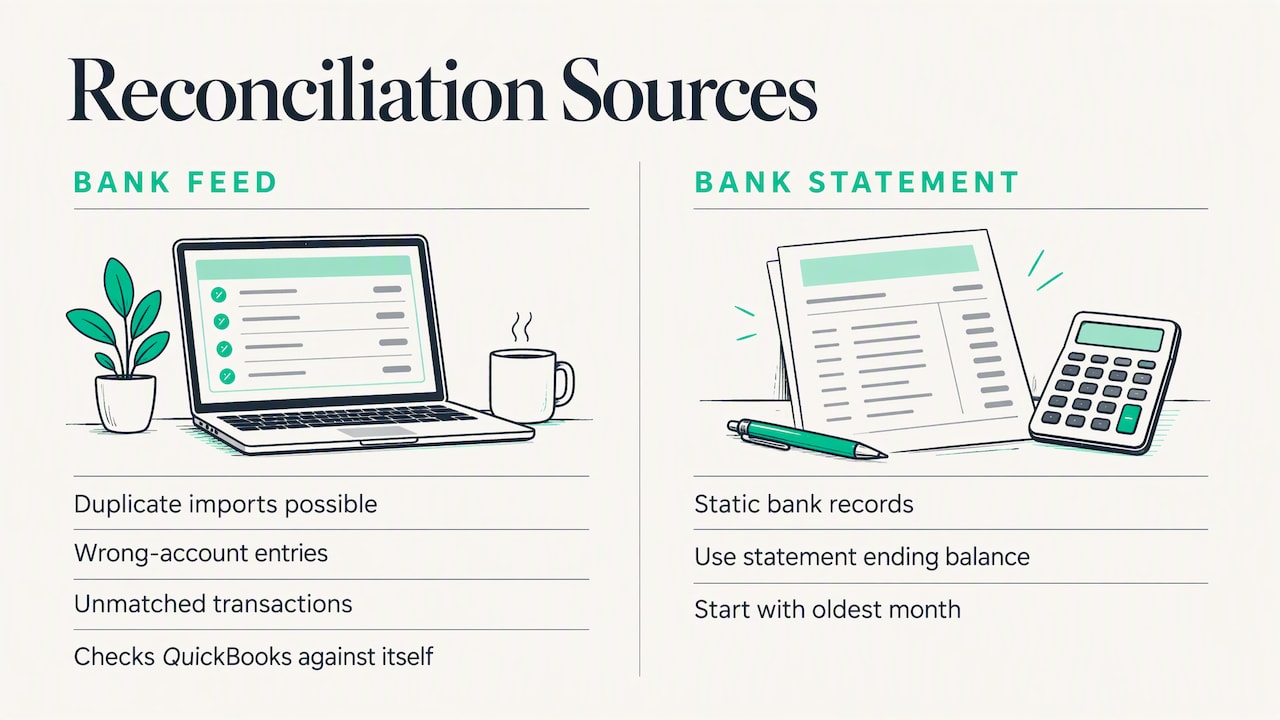
Statements from the bank are static. They do not change when someone edits a transaction. Reconcile each month to the ending balance on the statement, oldest month first, so each month’s opening balance is already proven before you start the next one. If the beginning balance on a reconciliation does not match the prior statement, stop and find out why. Common causes are a transaction changed after reconciling, a deleted reconciled entry, or a bank account that was set up with the wrong opening balance. Our guide to reconciling QuickBooks monthly covers the routine that prevents this from coming back.
Where the usual problems hide
| Symptom | Likely cause | What to check |
|---|---|---|
| Bank balance differs from QuickBooks | Unreconciled months, duplicates, deleted entries | Reconciliation reports against statements |
| Big Uncategorized Expense balance | Bank feed items accepted without review | Transaction detail by account, grouped by vendor |
| Open invoices that were paid | Deposits recorded as income instead of payments | Undeposited Funds and unapplied payments |
| Payroll liabilities that never clear | Tax payments entered as expenses | Payroll provider reports and tax filings |
| Negative inventory or asset balances | Purchases coded to the wrong accounts | Balance Sheet detail and vendor bills |
| Owner equity looks wrong | Draws and personal spending coded to expenses | Equity accounts and personal card activity |
Use the table as a diagnostic, not a shortcut. Each symptom can have several causes, and the same cause can show up in more than one place.
Cleaning up QuickBooks Online
If you are searching for how to clean up QuickBooks Online specifically, the process is the same, with a few tool-specific habits:
- Use the Reconcile tool, then the reconciliation report. Keep a PDF of each completed reconciliation with your records.
- Work from the For Review tab with discipline. Add a bank rule only when you are sure it will categorize correctly every time. A wrong rule repeats the same mistake every month.
- Use the Audit Log. It shows who changed what and when, which helps you find the edit that broke a reconciliation.
- Check Undeposited Funds. A lingering balance usually means customer payments were recorded but never matched to a bank deposit.
- Set the closing date under Advanced settings once a period is finished.
Can you clear everything and start over? Technically you can start a new company file, but you rarely should. You lose history your tax preparer and lender may need, and the opening balances still have to be right. Fixing the file you have, with a documented baseline, is almost always the better route.
What the IRS expects from your records
A cleanup is not only about tidy reports. Your books are the foundation of your tax return, and the IRS expects records that support what you report. Publication 583 notes that records for property must be kept until the period of limitations expires for the year you dispose of it in a taxable disposition, and that employment tax records should be kept for at least four years after the tax is due or paid. For electronic systems, the IRS also publishes requirements for automated records, which describe what a taxpayer’s records must show when they are kept in a data processing system.
Practically, that means: keep your baseline reports, statements and reconciliation PDFs, and do not delete the original documents behind a corrected entry. If the cleanup changes a number on a filed return, talk to your CPA before you do anything else.
Our perspective: cleanup is where tax planning starts
We are a CPA firm, and we see cleanup differently from a bookkeeper who only needs the numbers to tie. Clean books are the starting line, not the finish.
A business with unreconciled books cannot plan taxes. You cannot know whether to buy equipment before year-end, adjust estimated payments, or consider an S corporation election if you do not know your real profit in October. That is why we tie cleanup to the year-round approach we take with every small business client: tax, accounting, payroll and advice that connect to each other.
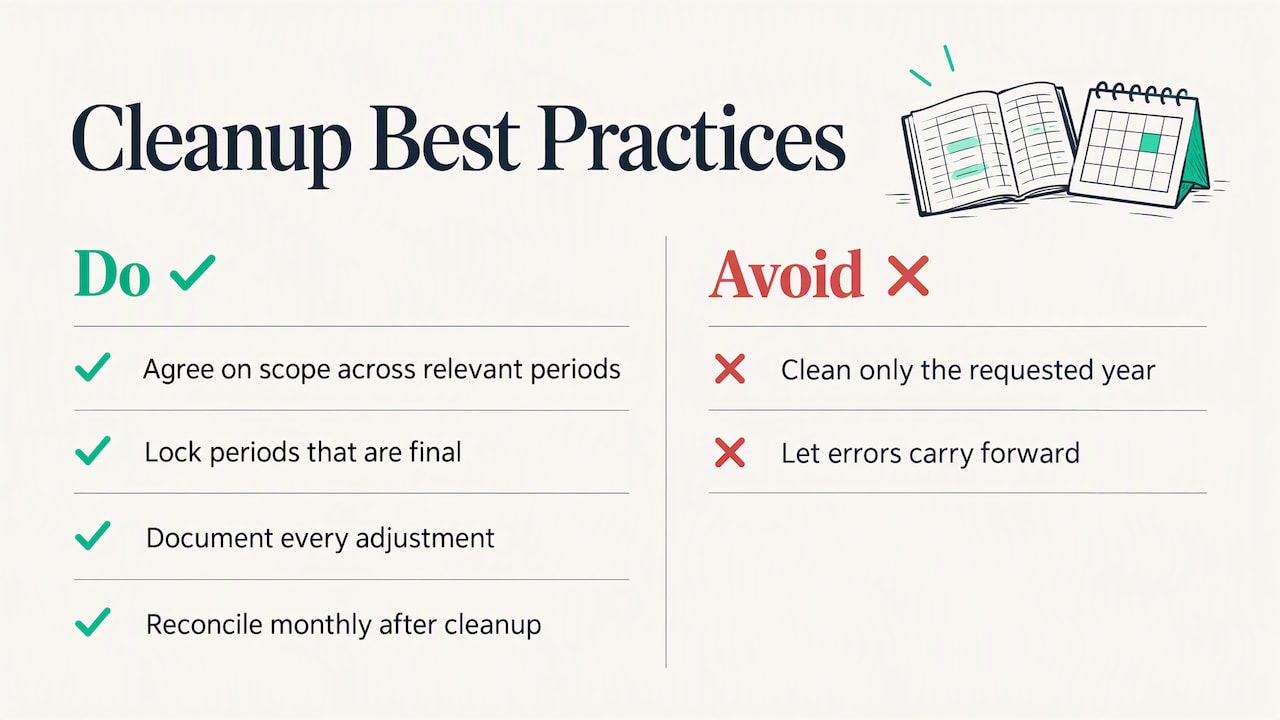
We also push back on one habit. Owners often want to clean up only the year their accountant is asking about. The trouble is that errors carry forward. A wrong opening balance in one year quietly distorts the next, and a loan or asset coded incorrectly can affect depreciation and deductions. We would rather agree a scope that covers the periods that matter, lock the ones that are final, and document every adjustment so your return and your books tell the same story.
And we say this to every owner: cleanup without a new routine is a temporary fix. If nobody reconciles monthly after the cleanup, you will be back in the same place in a year. The routine is the real product.
— Justin
Should you do it yourself or hire a CPA?
Doing it yourself makes sense when the problem is small: a few months behind, one or two accounts, no payroll complications, and no filed returns affected. Set aside a block of time, follow the order above, and you can get there.
Bring in a professional when any of these apply:
- The mess spans more than one tax year, or it touches a year that has already been filed.
- Payroll liabilities do not match your payroll reports or filings.
- You have multiple entities, intercompany transfers or owner loans that cross between them.
- You run a specialized business such as real estate or cannabis, where account structure and tax treatment have industry quirks.
- A deadline is close, such as a loan application, a sale, or a notice from a tax agency.
- You have tried once already and the file got worse.
How long a cleanup takes and what it costs
Timelines and fees vary widely, and any number published without seeing your file is a guess. What moves the cost is consistent from firm to firm:
- Months behind. Three months of backlog and three years are different jobs.
- Transaction volume. More accounts and more monthly transactions mean more to reconcile.
- Quality of source records. Missing statements or receipts add research time.
- Payroll and sales tax issues. Unfiled or wrong filings add work and can add urgency.
- Multiple entities or inventory. Each adds a layer to verify.
- State of the file. Heavy duplicate entries and deleted reconciled transactions take longer to untangle.
We do not publish prices for cleanup work. We scope each engagement after looking at your file, so you know what is included before work starts. Ask any provider you talk to for the same: a written scope, the periods covered, the deliverables, and how changes to filed periods will be handled.
Work with our team on your cleanup
If you would rather hand this off, our QuickBooks consulting services cover cleanup, setup and ongoing support, and our bookkeeping services keep the books current afterwards. Because we are a CPA firm working with small businesses, startups, real estate investors and cannabis operators, the cleanup connects directly to tax planning and your return. You can start from our main page and tell us where your file stands.
After the cleanup: keep the books clean
A finished cleanup should leave you with a short routine, not a heap of cleaned-up history.
- Reconcile monthly, within a couple of weeks of each month’s close.
- Review the feed weekly and categorize as you go, rather than accepting in bulk.
- Lock each month or year once it is reconciled and reviewed.
- Review the P&L and Balance Sheet every month and ask about anything unusual.
- Tighten who can do what in the file. Accounting controls for small businesses do not need to be elaborate to be effective.
- Use the numbers. Clean data supports financial reporting for business owners, cash flow forecasting and tax planning, which is what the cleanup was for.
If you run a cannabis business, our page on cannabis accounting explains why account structure deserves extra care. If you are a landlord, real estate accounting has its own cleanup traps, such as mixing repairs with improvements.
FAQ
How much does it cost to have QuickBooks cleaned up?
The fee depends on how many months are off, how many accounts and transactions are involved, and whether payroll or multiple entities complicate the file. Be wary of a flat quote given without anyone looking at your books. Ask for a written scope and the periods covered before you agree.
Can I clear my QuickBooks and start over?
You can start a new company file, but it is rarely the best move. You lose transaction history that your tax preparer, lender or an auditor may need, and you still have to enter correct opening balances. Fixing the existing file, with a saved baseline and locked closed periods, is safer.
How long should I keep my records after a cleanup?
Keep the original statements, reports and reconciliation PDFs for as long as they matter for tax administration, which generally means until the period of limitations expires for the related return. IRS Publication 583 gives the details, including that employment tax records should be kept at least four years. Property records follow a longer timeline tied to the year you dispose of the asset. Your CPA can confirm the right period for your situation.
Is a bookkeeping cleanup checklist enough, or do I need a CPA?
A checklist is enough for a small, recent backlog in a simple business. Once the problems span filed tax years, payroll, or several entities, a CPA can do the cleanup and judge how the corrections affect your return. That second part is the piece a checklist cannot cover.
Sources
- IRS Publication 583, Starting a Business and Keeping Records
- IRS, Automated records
- Intuit QuickBooks, 12 steps for bookkeeping clean up
- FitSmallBusiness, Bookkeeping Cleanup Checklist: 8 Steps for Small Businesses