

A chart of accounts is the numbered list of every account your business uses to record money: what you own, what you owe, what comes in and what goes out. For a small business, the right one is short, built around how you actually earn and spend money, and organized so your tax return nearly writes itself. This guide shows you how to build that list, with examples for a general small business and for rental property, and how to fix the default list in QuickBooks.
TL;DR
- A chart of accounts has five categories: assets, liabilities, equity, revenue and expenses. Every transaction lands in two of them.
- Start from your operations, not from software defaults. Keep the list short, usually 30 to 60 accounts for a small company, and add only when you need a new report.
- Number accounts in ranges (1000s assets through 6000s expenses) and leave gaps so you can add accounts without renumbering.
- Avoid catch-all accounts like “Professional Fees” or “Miscellaneous.” They hide deductions and force your CPA to reclassify later.
- Rental properties and real estate investors need per-property income and expense tracking from day one.
Table of Contents
- What a chart of accounts does
- The five account types, with small-business examples
- How to set up a chart of accounts, step by step
- A sample chart for a service-based small business
- Fixing the QuickBooks default chart
- Chart of accounts for rental property and real estate
- Mistakes that cost you at tax time
- Keep your records in a form you can produce
- How we approach it
- When to get help with your chart
- FAQ
- Sources
What a chart of accounts does
Think of it as the filing system for your finances. AccountingCoach describes it as the list of account names a company makes available for recording transactions in its general ledger, and notes that a company can tailor the list to suit its needs. That flexibility is the point. Two bakeries, two landlords or two consultants can have very different charts.
Every account you create ends up on one of two reports:
- Balance sheet accounts (assets, liabilities, equity) show what you own and owe at a point in time. The SBA calls the balance sheet the foundation of managing your finances, a snapshot of capital, assets, liabilities and equity.
- Profit and loss accounts (revenue and expenses) show how you did over a period.
If an account does not help you read one of those reports, or complete a tax form, it probably does not need to exist.
The five account types, with small-business examples
| Type | Typical number range | What it holds | Examples |
|---|---|---|---|
| Assets | 1000 to 1999 | What the business owns | Checking, savings, accounts receivable, inventory, equipment, accumulated depreciation |
| Liabilities | 2000 to 2999 | What the business owes | Credit cards, accounts payable, sales tax or payroll taxes payable, loans, security deposits held |
| Equity | 3000 to 3999 | The owner’s stake | Owner’s contributions, owner’s draws or distributions, retained earnings |
| Revenue | 4000 to 4999 | Money earned | Service income, product sales, rental income, refunds and discounts |
| Expenses | 5000 to 6999 | Money spent | Cost of goods sold, payroll, rent, insurance, software, advertising, vehicle costs |
The numbering convention is common practice rather than a legal requirement. Sample charts such as the one at Double Entry Bookkeeping show each account with a name, a financial statement section, a group and a suggested code, which is a good model for your own spreadsheet.
Why numbers and gaps matter
Numbers keep accounts in a logical order and let you group them. Use increments of 10 so you can slip in a new account later. If you open a second checking account, it becomes 1020 and nothing else moves.
How to set up a chart of accounts, step by step
- Pick your accounting method first. The IRS explains in Publication 583 that you choose cash or accrual when you file your first return and generally use the same method for your books and your return. Businesses that hold inventory to account for income generally must use accrual, though some small taxpayers qualify for the cash method. Your method decides whether you need accounts like accounts receivable and accounts payable.
- List how you make money. Each real revenue stream gets its own income account. A landscaper with design fees, maintenance contracts and material resale needs three, not one called “Sales.”
- List what you spend by tax category. Start from the lines on your return rather than from a generic list. Advertising, insurance, legal and professional fees, repairs, supplies, travel, utilities and wages are separate lines for a reason.
- Add balance sheet accounts for every place money sits or is owed. Each bank account, credit card, loan and major asset class gets an account. Owner draws and contributions go in equity, never in expenses.
- Number the accounts in ranges, leaving gaps.
- Use sub-accounts for detail, not for clutter. Put “Flights” and “Hotels” under “Travel” so the report rolls up cleanly but you can still see the pieces.
- Write a one-line rule for each account about what belongs there. Whoever enters transactions, you, a bookkeeper or your CPA, then codes things the same way.
- Review it after one quarter. Setting up a chart of accounts is an iterative process, and the best lists are adjusted once real transactions reveal what you need to see.
A sample chart for a service-based small business
This is a starting point for a small LLC or sole proprietorship with no inventory. Adjust it to your own operations.
Assets
- 1010 Operating checking
- 1020 Savings (tax reserve)
- 1100 Accounts receivable
- 1500 Equipment
- 1590 Accumulated depreciation
Liabilities
- 2010 Business credit card
- 2100 Accounts payable
- 2200 Payroll taxes payable
- 2300 Sales tax payable (if applicable)
- 2500 Loans payable
Equity
- 3010 Owner’s contributions
- 3020 Owner’s draws
- 3900 Retained earnings
Revenue
- 4010 Service revenue
- 4020 Product sales
- 4090 Refunds and discounts
Expenses
- 6010 Advertising and marketing
- 6020 Bank and merchant fees
- 6030 Contract labor
- 6040 Insurance
- 6050 Legal and professional fees (accounting, legal as sub-accounts)
- 6060 Office supplies and software
- 6070 Rent
- 6080 Repairs and maintenance
- 6090 Travel
- 6100 Utilities and phone
- 6200 Wages
- 6210 Payroll taxes
That is under 40 accounts, which is plenty for many small companies. If you carry inventory, add a cost of goods sold range in the 5000s.
Fixing the QuickBooks default chart
Most people search for this because they opened QuickBooks and found a list they did not choose. Software defaults are a generic guess at what a typical business needs, and you should not assume they fit you.
In QuickBooks Online, every account has an account type (which report section it lands in) and a detail type (a more specific definition). Intuit’s help article explains that each category carries both. The detail type matters because it affects how the account behaves and how it is grouped in reports.
A practical cleanup routine:
- Print or export the list and mark every account you have never used.
- Delete or inactivate unused accounts, and merge duplicates. Merging combines the history, so do it deliberately.
- Split catch-alls. Accounts such as “Marketing” or “Professional Fees” tend to swallow unrelated spending, which obscures deductibility and complicates tax preparation. Break them into specific accounts.
- Check detail types on any account you created or renamed.
- Reconcile first. Do not restructure on top of unreconciled bank and card accounts.
This is the kind of cleanup we do in QuickBooks consulting engagements: reshape the list around the business, then connect it to reporting.
Chart of accounts for rental property and real estate
Landlords and investors outgrow a generic chart quickly, because one blended “Rental Income” account hides which property is making money.
The core idea: track income and expenses by property. You can do this with sub-accounts, classes or locations in your software, but decide on one method and use it consistently.
Income accounts
- 4010 Rental income
- 4020 Late fees
- 4030 Application and pet fees
- 4040 Utility reimbursements
Expense accounts
Many landlords mirror the expense categories on their tax forms so that year-end is a transfer, not a rebuild:
- Advertising and tenant screening
- Insurance
- Property management fees
- Repairs and maintenance
- Cleaning and turnover
- Supplies
- Utilities
- Property taxes
- Mortgage interest
- Legal and professional fees
- Travel
Balance sheet accounts that landlords forget
- Land and Buildings as separate assets, because land is not depreciated.
- Capital improvements as assets, separate from repairs. A new roof and a patched roof are treated differently for tax.
- Accumulated depreciation per property.
- Security deposits held as a liability, ideally mirrored by a separate bank account.
- Mortgage payable per loan, with interest split from principal at each payment.
The repairs-versus-improvements line and the principal-versus-interest split are where most self-kept rental books go wrong. Our guide to deductions landlords should track covers what belongs where, and our real estate accounting services page explains how we set up books for investors with several properties.
If you manage properties for other owners, add a trust liability account for owner funds and keep it separate from your own operating money.
Mistakes that cost you at tax time
Treating the business checkbook as the books
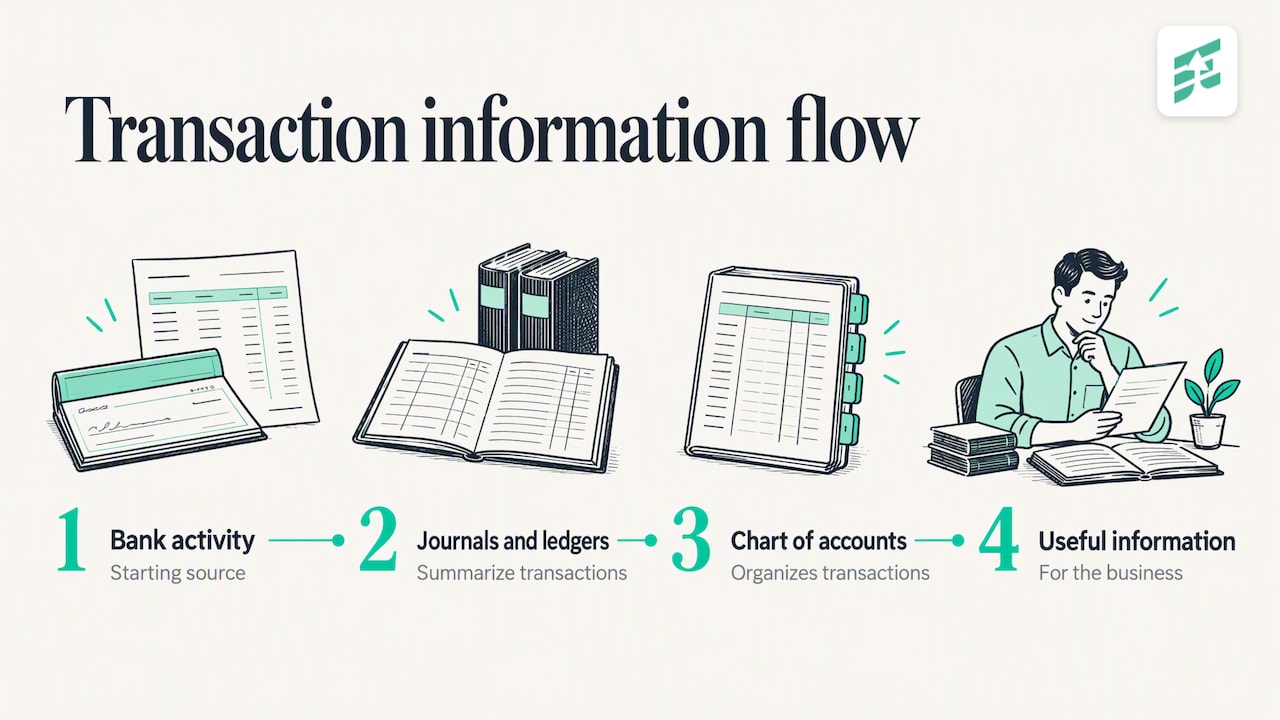
The IRS is clear that a checkbook is a starting source of information, not a substitute for a system that summarizes transactions in journals and ledgers. A good chart of accounts is what turns raw bank activity into something you can use.
Mixing personal and business spending
Owner draws, personal card charges and loans to or from the owner belong in equity or liability accounts, not in expenses. Mixed accounts are the fastest way to create a cleanup bill.
Too many accounts, or too few
Fifty-line charts with several near-duplicates produce inconsistent coding. A five-account chart tells you nothing. Aim for the smallest list that answers the questions you ask of the business.
Catch-all accounts
“Miscellaneous” and “Ask my accountant” balances grow quietly. Review them monthly and clear them.
Changing the structure mid-year without a plan
Renaming and merging accounts is fine, but note what you changed and when, so comparisons to prior periods still make sense.
Keep your records in a form you can produce
The IRS says the type of business you run shapes the recordkeeping system you need. The law does not require a specific format, but the system must clearly and consistently show income and expenses. That same guidance, in Publication 583, says electronic records follow the same retention and control expectations as paper: you need to be able to index, store, retrieve and reproduce them in legible form if the IRS asks. A clean chart of accounts makes that far easier.
Private companies are also not required to follow GAAP, according to the SBA, though standardizing your reporting that way is recommended. Using standard account types is a simple step in that direction.
How we approach it
We build the chart around the decisions you need to make, then work backwards to the tax return. A chart that only satisfies a filing deadline gives you a rear-view mirror. A chart designed with tax planning in mind lets us see in September, not April, where deductions, estimated payments and entity questions are heading.
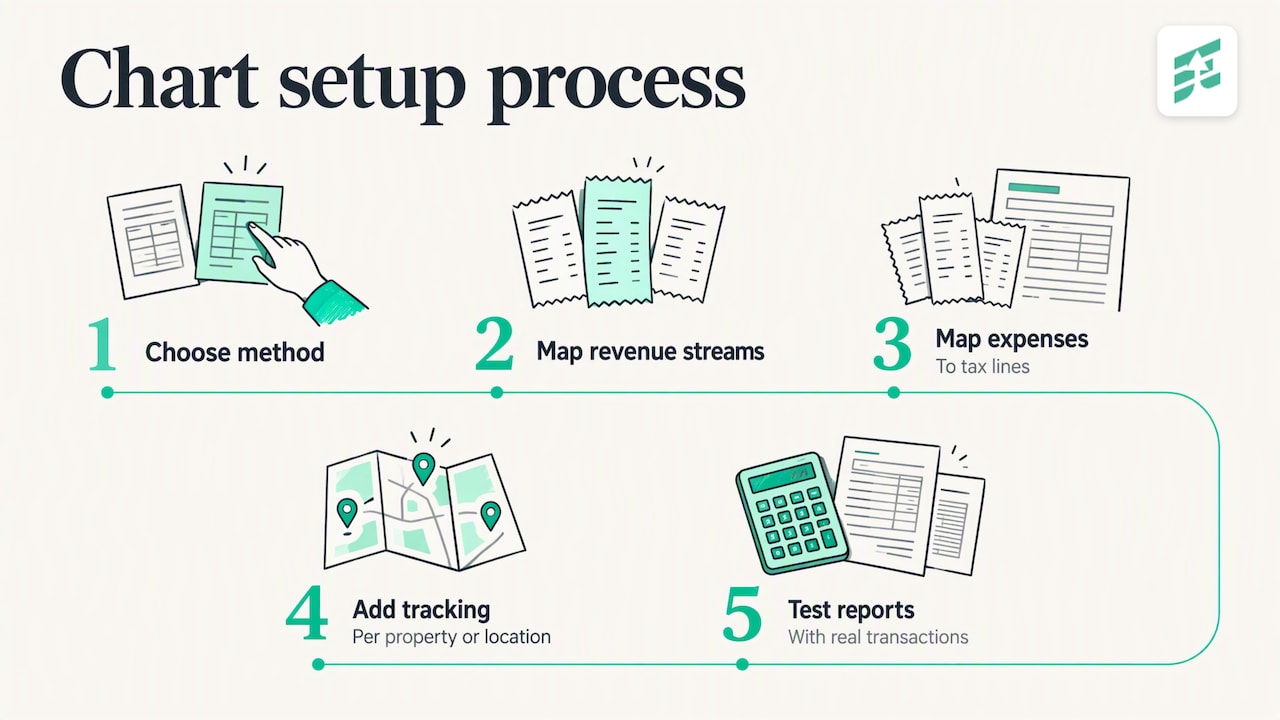
For most clients the order is: choose the method, map revenue streams, map expenses to tax lines, add per-property or per-location tracking where it matters, then test the reports with real transactions. Startups get the same treatment with growth in mind, so the structure holds up when you add employees, a second location or outside investors. Cannabis operators and real estate investors need extra structure because of how their costs and entities are treated, and the chart is where that starts.
We would rather spend an hour on the chart at the start than ten hours reclassifying a year of transactions in the spring.
— Justin Ash, CPA
When to get help with your chart
You can build a basic chart yourself with the steps above. Bring in a CPA when:
- You are starting a business and want the books right from day one (see our approach to startup accounting system setup).
- Your QuickBooks file has years of miscoded transactions.
- You own several properties or entities, or you operate in a regulated industry.
- You are about to add payroll, inventory or a second location.
Elevate Business Consulting is a CPA firm in Medford, Oregon, serving small businesses, startups, real estate investors and cannabis operators. We handle bookkeeping, payroll, tax planning and preparation, and advisory work under one roof, so your chart of accounts, your books and your tax strategy all line up. If your chart needs a rebuild, get in touch with us and we will start with your current file.
FAQ
How many accounts should a small business have?
There is no fixed number, but many small businesses work well with roughly 30 to 60. Start with the minimum that supports your financial statements and tax return, then add accounts only when you need to report something separately. Inactive accounts can be hidden without losing history.
Can I change my chart of accounts after I start?
Yes. You can rename, add, merge and inactivate accounts at any time. Be careful with merges, because they combine history permanently, and avoid major restructuring in the middle of an unreconciled period. A CPA can help you restructure without breaking comparisons to prior years.
Do I need a different chart of accounts for an LLC?
The structure is largely the same, but the equity section differs by tax treatment. A single-member LLC typically tracks owner contributions and draws, while an S corporation election brings in shareholder distributions and owner wages. Our article on LLC versus S corporation taxes explains how the choice affects your books.
Should I use the default QuickBooks chart of accounts?
Use it as a starting draft, not a final answer. Defaults are generic and often include catch-all accounts that hide deductions. Remove what you do not use, split vague categories and add accounts for your own revenue streams.
What is the best chart of accounts for rental property?
The best one tracks income and expenses per property, separates repairs from capital improvements, and holds land, buildings, depreciation, mortgages and security deposits in their own balance sheet accounts. Matching expense accounts to the categories on your tax forms keeps year-end simple.
Sources
- IRS Publication 583 (Rev. January 2021)
- U.S. Small Business Administration: Manage your finances
- AccountingCoach: Chart of Accounts explanation
- Double Entry Bookkeeping: Chart of Accounts example
- Intuit: Choosing the right account types in QuickBooks